
Tag: Python

  • Bevezetés a neurális hálózatok világába 4. rész

    Introduction to the World of Neural Networks Part 4

    Why Use NumPy?

    In the previous articles, we built an artificial neuron and a simple layer using pure Python code. The logic was not complicated: weighted sum, add bias, and optionally apply an activation function.    
    But as networks grow larger — with multiple layers and hundreds or thousands of neurons — pure Python solutions become:  

    • slow,  
    • hard to manage,  
    • and prone to errors.    

    This is why we use the NumPy library, which is:    

    • very fast (written in C language),  
    • reliable (thoroughly tested),    
    • and makes vector and matrix operations easy.    

    Vectors, Arrays, Matrices and Tensors

    Before we look at how NumPy is used through specific examples, it is important to clarify a few concepts.

    Let's start with the simplest Python data store, the list. A Python list contains comma-separated numbers enclosed in square brackets. In the previous sections, we used lists to store data in our pure Python solutions.

    Example of a list:

    list = [1, 5, 6, 2]

    List of lists:

    list_of_lists = [[1, 5, 6, 2],
    				         [3, 2, 1, 3]]

    List of lists of lists:

    list_of_lists_of_lists = [[[1, 5, 6, 2],
                               [3, 2, 1, 3]],
                              [[5, 2, 1, 2],
                               [6, 4, 8, 4]],
                              [[2, 8, 5, 3],
                               [1, 1, 9, 4]]]

    All of the above examples can also be called arrays. However, not all lists can be arrays.

    For example:

     [[1, 2, 3],
       [4, 5],
       [6, 7, 8, 9]]

    This list cannot be an array because it is not "homologous". A "list of lists" is homologous if each row contains exactly the same amount of data and this is true for all dimensions. The example above is not homologous because the first list has 3 elements, the second has 2, and the third has 4.

    The definition of a matrix is ​​simple: it is a two-dimensional array. It has rows and columns. So a matrix can be an array. Can every array be a matrix? No. An array can be much more than rows and columns. It can be 3, 5, or even 20 dimensions.

    Finally, what is a tensor? The exact definition of tensors and arrays has been debated for hundreds of pages by experts. Much of this debate is caused by the participants approaching the topic from completely different areas. If we want to approach the concept of tensor from the perspective of deep learning and neural networks, then perhaps the most accurate description is: "A tensor object is an object that can be represented as an array."

    In summary: A linear or 1-dimensional array is the simplest array, and in Python, a list corresponds to this. Arrays can also contain multidimensional data, the most well-known example of which is a matrix, which is a 2-dimensional array.

    One more concept that is important to clarify is the vector. Simply put, a vector used in mathematics is the same as a Python list, or a 1-dimensional array.

    Two Key Operations: Dot Product and Vector Addition

    When performing the dot product operation, we multiply two vectors. We do this by taking the elements of the vectors one by one and multiplying the elements with the same index, then adding these products. Mathematically, this looks like this:

    \vec{a}\cdot\vec{b} = \sum_{i=1}^n a_ib_i = a_1\cdot b_1+a_2\cdot b_2+...+a_n\cdot b_n

    It is important that both vectors have the same size. If we wanted to describe the same thing in Python code, it would look like this:

    # First vector
    a = [1, 2, 3]
    
    # Second vector
    b = [2, 3, 4]
    
    # Dot product calculation
    dot_product = a[0]*b[0] + a[1]*b[1] + a[2]*b[2]
    
    print(dot_product)
    
    >>> 20

    You can see that we have performed the same operation as when calculating the output value of a neuron, only here we have not added the bias. Since the Python language does not contain any instructions or functions for calculating the dot product by default, we use the NumPy library.

    When adding vectors, we add the elements of each vector with the same index. Mathematically, this looks like this:

    \vec{a}+\vec{b} = [a_1+b_1, a_2+b_2,...,a_n+b_n]

    Here again, it is important that the vectors have the same size. The result will be a vector of the same size. NumPy handles this operation easily.

    Using NumPy

    A neuron

    Let’s now implement a neuron using NumPy.  

    import numpy as np
    
    # Inputs and weights
    inputs = np.array([0.5, 0.8, 0.3, 0.1])
    
    weights = np.array([0.2, 0.7, -0.5, 0.9])
    
    bias = 0.5
    
    # Neuron output (dot product + bias)
    output = np.dot(inputs, weights) + bias
    
    print("Neuron output:", output)

    Here, np.dot(inputs, weights) computes the dot product, and then we simply add the bias.  

    A layer

    Now let’s build a layer of 3 neurons, each receiving 4 inputs.    

    import numpy as np
    
    # Example inputs (4 elements)
    inputs = np.array([1.0, 2.0, 3.0, 2.5])
    
    # Weights for 3 neurons (matrix: 3 rows, 4 columns)
    weights = np.array([
                    [0.2, 0.8, -0.5, 1.0],       # Neuron 1
                    [0.5, -0.91, 0.26, -0.5],    # Neuron 2
                    [-0.26, -0.27, 0.17, 0.87]   # Neuron 3
    ])
    
    # Bias values (3 elements)
    biases = np.array([2.0, 3.0, 0.5])
    
    # Layer output (matrix multiplication + vector addition)
    output = np.dot(weights, inputs) + biases
    
    print("Layer output:", output)
    
    >>> Layer output: [4.8   1.21  2.385]

    Here, np.dot(weights, inputs) computes the matrix-vector product, which is exactly the weighted sum for each neuron. Adding the bias vector completes the computation.  

    Next Article

    In the next article, we will explore activation functions, and see how they provide the "nonlinear power" that makes neural networks much more capable. Without them, our network would only be able to model simple linear relationships.  
  • Bevezetés a neurális hálózatok világába 3. rész

    Introduction to the World of Neural Networks Part 3

    In the previous section, we saw how a single artificial neuron works. But a neuron on its own isn't very useful. Its true usefulness comes when you connect multiple neurons together to form a layer. In this section, we'll look at that in a little more detail.

    What Is a Layer?

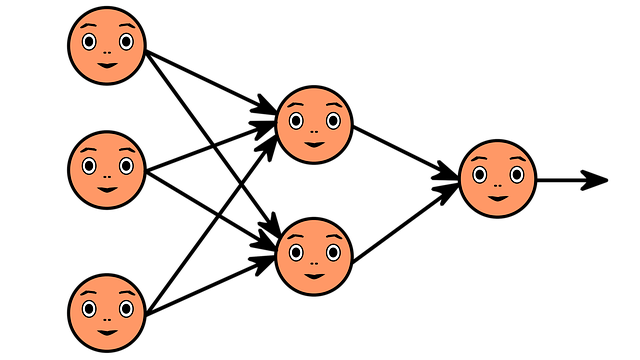
    In simple terms, a layer is a bunch of neurons that work with the same input data, but each neuron processes that data with different weights and biases. This data can come directly from the input or from a previous layer. Thanks to the different weights and offsets, each neuron can recognize different patterns in the same data.

    For example, if we analyze an image with a neural network, some neurons can recognize vertical lines, others horizontal lines, and still others oblique lines. By combining these appropriately, it becomes possible to recognize more complex shapes. This is how Facebook's feature that recognizes faces in photos works, for example.

    Let's look at an example.

    For the sake of illustration, let's build a simple layer with:

    • 4 inputs: x1, x2, x3, x4
    • 3 neurons

    Each neuron uses four weights (one for each input) and a bias, from which it calculates its own output value.

    z_j= w_{j1} \cdot x_1 + w_{j2} \cdot x_2 + w_{j3} \cdot x_3 + w_{j4} \cdot x_4 + b_j

    In this formula, j refers to each neuron (1, 2, 3). After the calculations are done, the output of the layer will be a three-element vector: [z1, z2, z3]. This can be either the input to a next layer or a final result that is not processed further.

    Python example: calculating the output of a layer

    Let's see how we can program the above example in Python.

    Important: in this example we do not use an activation function, we only calculate the “raw” output data.

    # A layer with 3 neurons and 4 inputs
    
    inputs = [1, 2, 3, 2.5]
    weights = [[0.2, 0.8, -0.5, 1.0],
               [0.5, -0.91, 0.26, -0.5],
               [-0.26, -0.27, 0.17, 0.87]]
    biases = [2, 3, 0.5]
    
    # Output of the layer
    layer_outputs = []
    
    # Calculate the output of each neuron
    for neuron_weight, neuron_bias in zip(weights, biases):
        # Calculate the weighted sum
        neuron_output = 0
        for n_input, weight in zip(inputs, neuron_weight):
            neuron_output += n_input * weight
        # Add the bias
        neuron_output += neuron_bias
        # Append the output of the neuron to the layer outputs
        layer_outputs.append(neuron_output)
    
    print("Output of the layer:",layer_outputs)
    
    >>>
    # Output of the layer4.8, 1.21, 2.385]

    Why Is This Useful?

    A layer of multiple neurons can recognize multiple patterns in data at once. This is the first step towards building deeper networks, where we can stack multiple layers on top of each other to solve increasingly complex problems.

    Next Article

    In the next article, we will look at why it is worth using the NumPy library instead of pure Python solutions. It can calculate a single layer or even an entire network much faster and more elegantly, especially when the network is larger and consists of multiple layers.

  • Bevezetés a neurális hálózatok világába 2. rész

    Introduction to the World of Neural Networks Part 2

    In the previous article, we introduced the basic idea of neural networks and saw that an artificial neuron is a simplified version of the brain’s nerve cells. Now let’s take a closer look at how a biological neuron works and how we can model it in a computer.

    How Does a Neuron Work?

    The Biological Neuron

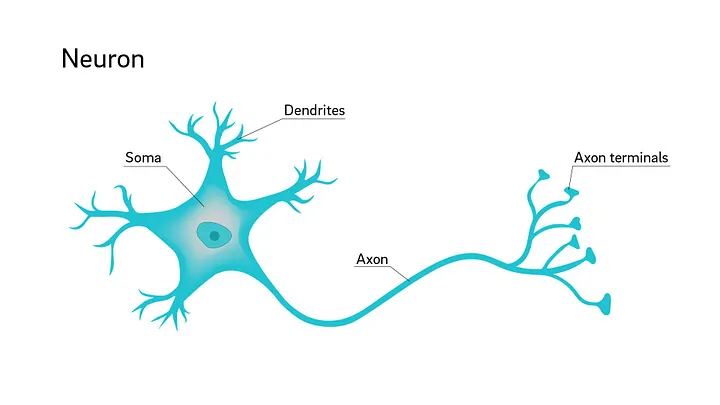
    Without going into too much scientific detail, a biological neuron is made up of four main parts:

    • Dendrites: it receives information from other neurons through these.
    • Cell body (Soma): this processes the signals received by the dendrites.
    • Axon: the neuron sends (or not) the processed signal through this.
    • Axon terminals: the branches of the axon through which other neurons perceive the output signal.

    So, the cell body receives signals from other neurons through the dendrites, processes them, and if the signal resulting from the processing reaches a certain level, the neuron "fires", i.e. sends a signal through the axon to the other neurons connected to it.

    Artificial Neuron

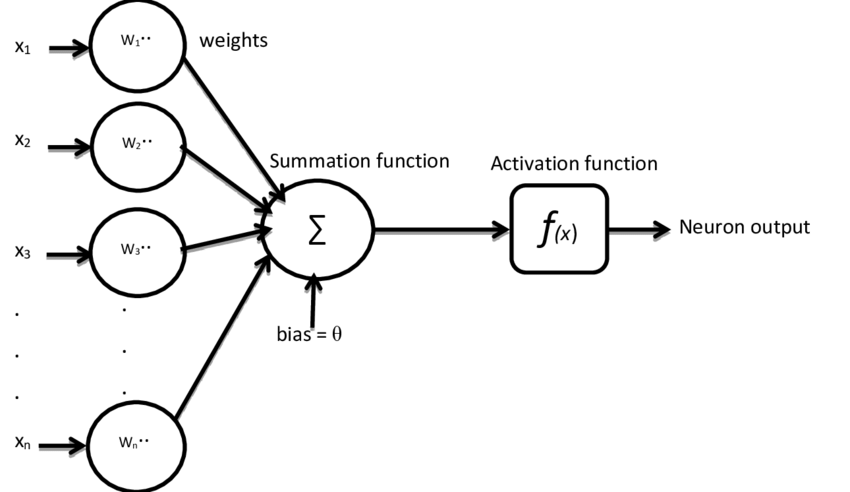
    The artificial neuron attempts to mimic this operation mathematically. Its most important parts are:

    • Inputs: these simulate the dendrites, through which the neuron receives data.
    • Weights: each input has a weight that shows how much the data arriving at the given input influences the output value.
    • Bias: an offset is added to the weighted sum of the input signals, which can also influence the output result.
    • Activation function: this makes the decision as to what value should be output by the neuron ("fire" or not) based on the previously summarized data.

    In Mathematical Form

    Let the inputs be in order x1, x2…xn, their corresponding weights w1, w2…wn, and the bias b. The operation performed by the neuron is as follows:

    z=w_1 \cdot x_1 + w_2 \cdot x_2 + \ldots + w_n \cdot x_n + b

    The activation function receives the value of z calculated in this way. In this case, let's take a simple step function that examines the input value and if it is zero or greater, it outputs 1, and if it is less than zero, it outputs 0.

    y=\begin{cases} 1 & \text{ha } z \geq 0 \\ 0 & \text{ha } z < 0 \end{cases}

    There are many types of activation functions (e.g. Sigmoid, ReLU, tanh), which we will discuss in a separate section later.

    Python Example

    Let's see how to program a neuron in Python:

    # Inputs and weights
    inputs = [0.5, 0.8]     # two inputs
    weights = [0.4, 0.7]    # their associated weights
    bias = -0.5             # bias
    
    # Summarize input values
    sum = (inputs[0]*weights[0] + inputs[1]*weights[1] + bias) # 0.26
    
    # Calculating output with the step function
    output = 1 if sum >= 0 else 0
    
    print("Output of the neuron:", output) # 1

    Next Article

    In the next article, we will connect multiple neurons together and see how a simple layer is built. This will bring us closer to a complete neural network.

en_GB